

How to Use AI Imagery on Your Website Responsibly
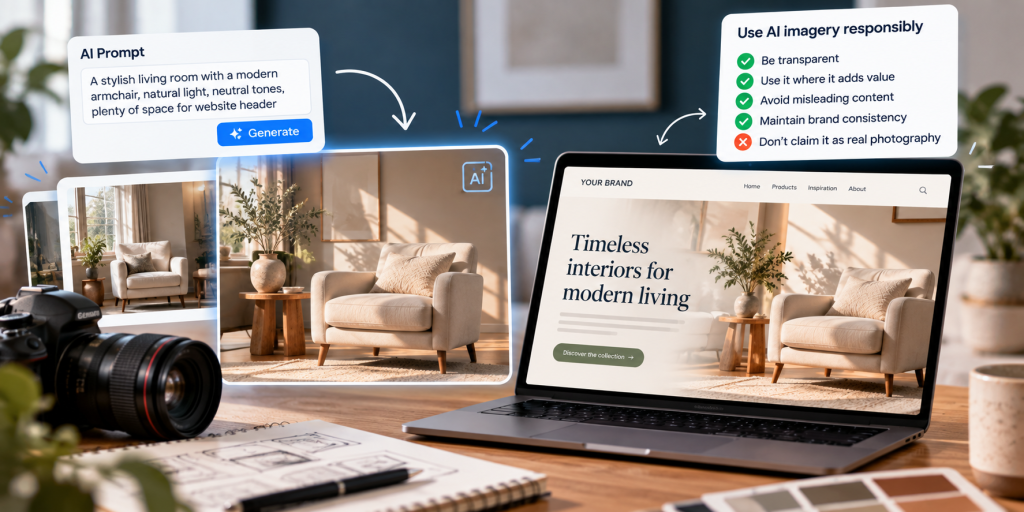
AI-generated imagery is becoming a useful tool for websites, especially for blog graphics, campaign visuals, concept images, background assets and supporting illustrations. It can help businesses create visuals more quickly and cost-effectively, but it needs to be used carefully. The aim should be to improve the user experience, not to mislead visitors or weaken the credibility of the content.
Used well, AI imagery can support website design, content production and digital campaigns. Used badly, it can create confusion about what is real, raise trust concerns and make a brand feel less credible. The challenge is not simply whether AI imagery is used, but how it is used and whether its role is appropriate for the page and the audience.
Responsible use starts with a clear principle: if an image has been generated or significantly altered using AI, a business should think carefully about whether users could mistake it for a real product, a real person, a real location or a real event. If there is a risk of misunderstanding, transparency becomes important.
This is particularly relevant for businesses that rely on trust and accurate representation. Hospitality, professional services, property, ecommerce, healthcare and high-consideration B2B businesses often need to be more cautious than brands using AI imagery purely for illustrative or editorial support.
Responsible use begins with whether the image could mislead somebody
The first question is not whether the image looks impressive. It is whether the image creates the right expectation for the user. If somebody could reasonably assume that an image shows a real product, a real member of staff, a real customer scenario or a genuine completed project, then the business needs to think carefully before publishing it without context.
This matters because imagery often communicates faster than text. A visitor may not read every supporting sentence on the page, but they will absorb the visual impression almost immediately. If the imagery suggests something that is not actually true, the website may be creating a trust problem before the copy has had a chance to clarify anything.
That does not mean AI imagery should be avoided altogether. It simply means the role of the image should be clear. An illustrative header image on a thought-leadership article is very different from an image representing a real hotel room, a real case study or a real item for sale.
Good web design and good SEO both depend on clarity. If the image helps the user understand the page more effectively, it may be useful. If it introduces uncertainty, exaggeration or false impression, it becomes a liability.
Before publishing an AI-generated visual, decide what the image is meant to do and how likely it is to be misunderstood.
Is it purely illustrative, brand-led, conceptual or decorative, or is it representing something factual and specific?
Consider whether a visitor could assume the image shows a real product, person, place, result or customer scenario.
If there is any risk of confusion, add clear labelling, supporting copy or use a different kind of image instead.
Ensure the image fits the brand, supports the page, includes suitable alt text and does not weaken trust.
AI visuals are often strongest in illustrative, conceptual and editorial roles
AI-generated images can be very effective when the page needs visual support but not literal proof. This includes blog headers, campaign visuals, abstract concept graphics, category banners, presentation imagery, idea-led content, mood visuals and other supportive design elements.
In these situations, the image is not usually expected to function as documentary evidence. Instead, it exists to set tone, reinforce the topic, support the brand style or help break up content visually. This is where AI imagery can be both efficient and useful.
Problems tend to arise when businesses use AI imagery in places where visitors expect accurate representation. The closer an image gets to influencing a factual judgement — such as “what exactly am I buying?”, “who will I be working with?” or “did this case study really happen?” — the more cautious a business should be.
Some uses of AI imagery are naturally safer than others.
Illustrative and editorial use
These are situations where the image is helping explain, introduce or support the content rather than claiming to show a real-world fact.
- Blog header images and thought-leadership visuals
- Abstract concept graphics for services or campaign themes
- Supporting visuals for guides, reports and insights content
- Background artwork, hero textures and stylistic brand assets
- Creative storytelling where the audience would expect illustration
Factual or trust-sensitive use
These are situations where the image could influence a user’s judgement about a real offer, outcome, person or place.
- Product images on ecommerce pages
- Team photos or “meet the experts” pages
- Case studies, customer scenarios or review-style content
- Property, hospitality or location imagery that implies a real setting
- Any visual presented as evidence of work completed or results achieved
Transparency is often the simplest way to protect trust
If an image has been generated using AI and there is a realistic chance that somebody may assume it is a real photograph or a literal representation, clear labelling is often a sensible step. This does not need to be dramatic. In many cases, a short caption or note is enough.
The purpose of labelling is not to draw unnecessary attention to the production method. It is to avoid creating a misleading impression. A simple note such as “AI-generated illustration” or “AI-generated visual created for illustrative purposes” can give users the context they need.
Businesses may choose different levels of disclosure depending on the page type, sector and audience expectations. Some may prefer visible captions. Others may place explanatory wording in image credits, supporting text or editorial notes. The important point is that if a user could be misled, the website should help prevent that misunderstanding.
There is more than one practical way to disclose AI-generated imagery.
Useful where the image appears in an editorial or article context and could be interpreted as a real photograph.
Example: “AI-generated image used for illustrative purposes.”Helpful when the page includes several visuals or where disclosure needs to sit alongside a broader explanation.
Example: “Visuals on this page include AI-generated illustrations created to support the topic.”Useful as part of a consistent content process so teams know how an image was produced and how it should be handled.
Example: Maintain internal image notes or metadata fields for source, usage and disclosure requirements.If the image could change what a user believes to be real, transparent context becomes more important than visual polish.
AI imagery should still follow normal accessibility and content standards
AI-generated visuals still need to work as part of a usable, accessible website. That means thinking about file size, responsiveness, loading behaviour, image relevance and alt text in the same way you would for any other image asset.
Alt text should describe the image as it appears and as it functions on the page. It should not become a place for keyword stuffing or vague statements about AI. If the fact that the image is AI-generated is essential to understanding the content, that may be worth reflecting in the surrounding copy or caption, but the alt text itself should remain useful to the person relying on it.
This is an important distinction. Alt text exists to support accessibility first. It should help somebody understand what the image communicates in context. The better the image fits the page, the easier it is to write alt text that is concise, accurate and genuinely useful.
Good alt text describes the image meaningfully. It does not turn the image into an SEO dumping ground.
This tells the user very little and reads more like an attempt to force keywords into the image field.
“AI marketing SEO digital agency website traffic business growth”This explains what the image is showing and how it connects to the page topic without unnecessary padding.
“AI-generated illustration of a marketing dashboard displaying website traffic data.”AI imagery does not replace good SEO practice
From an SEO perspective, AI imagery should be treated like any other website asset. It should be high quality, appropriately compressed, correctly sized, responsive across devices and relevant to the page. If the image adds useful meaning, its alt text and surrounding context should support that clearly.
However, AI-generated images do not create search value simply because they exist. An irrelevant visual, a slow-loading file or repetitive image usage across multiple pages can still weaken the page experience. The image needs to support the content rather than sit on the page as a decorative afterthought.
File naming, image captions, placement and surrounding copy can all contribute to clarity. Businesses should avoid the temptation to force keywords into every image-related field. Good SEO is still built on usefulness, page quality and relevance.
In many cases, AI imagery works best when it supports content-led pages such as insight articles, guides, reports or service explainers. In these contexts, its role is to assist comprehension or set visual tone rather than act as standalone proof.
If AI imagery is going on the website, it should still pass the same quality checks as any other asset.
Does it mislead?
Ask whether the image could create a false impression about a product, person, location, project or result.
Does it fit the page?
The image should support the actual content rather than appearing generic, irrelevant or disconnected from the topic.
Is labelling needed?
If a visitor could mistake the visual for a real photograph or factual representation, add suitable context.
Is the alt text useful?
Alt text should describe the image clearly and naturally for the people who rely on it.
Is the asset optimised?
Compression, responsive sizing and sensible loading behaviour still matter for user experience and SEO.
Does it feel credible?
The image should align with the website’s style, tone and quality expectations instead of undermining brand trust.
Even honest AI imagery can weaken a website if it feels generic or out of place
Another important consideration is brand consistency. AI-generated imagery can sometimes feel overly polished, generic or disconnected from the rest of the website. If the visual language shifts too dramatically from page to page, the site may feel less coherent and less trustworthy.
This is why AI imagery should sit within a clear design approach. Businesses should consider colour palette, composition, realism level, tone and subject matter so that the images support the overall brand rather than competing with it. This is especially important on websites where conversion rate optimisation matters. If imagery distracts or confuses, it can reduce clarity and confidence rather than improve them.
AI visuals should also not crowd out genuinely valuable real-world assets. Original photography, real product imagery, authentic team photos and actual project examples often carry more trust than even a very polished illustration. The most responsible approach is often a blend: real visuals where accuracy matters, AI visuals where illustration is enough.
Responsible use becomes easier when teams have a simple publishing framework
Businesses do not usually get into trouble because of one dramatic decision. More often, the problem appears gradually because nobody has agreed how AI imagery should be reviewed. A simple internal process can make a big difference.
That process does not need to be complicated. It may simply involve agreeing which page types can use AI imagery freely, which page types require review and which should rely on real photography or verified visuals only. Teams can also agree preferred disclosure wording, basic alt-text standards and minimum quality checks before publishing.
This is especially useful when content production is spread across marketing, design and external contributors. A shared framework helps keep the site more consistent and reduces the risk of one page unintentionally undermining the standards of another.
For some businesses, this may sit within a broader growth strategy or content governance process. For others, it may simply form part of standard website publishing practice.
The most effective use of AI imagery is not the most dramatic use — it is the use that supports the page clearly without damaging trust.
A short pre-publication review can prevent most avoidable problems
Before publishing AI-generated visuals, it is worth stepping back and checking whether the image is actually helping the page do its job. Is it improving clarity? Is it relevant? Could it confuse someone? Is it consistent with the rest of the site? Does it need a caption or note? Does the alt text describe it properly?
These are practical checks rather than theoretical debates. Most responsible use of AI imagery comes down to sensible editorial judgement. The goal is not to overcomplicate publishing. It is to make sure the image supports trust, accessibility, brand quality and user understanding.
AI imagery should support website quality, not substitute for it
Ultimately, AI-generated visuals are just one part of the wider website experience. They do not replace strong copy, clear positioning, trustworthy design, real proof or good user journeys. If a page lacks those fundamentals, no visual treatment — AI-generated or otherwise — will solve the underlying problem.
The strongest websites use imagery in service of communication. That means selecting visuals that reinforce the message, support trust and help the user understand what they are looking at. Sometimes AI imagery can play that role very well. Sometimes a real image is the better choice.
The important point is that businesses remain intentional. AI can be a useful creative tool, but it should be used with human judgement and a clear understanding of what the user needs from the page.
The safest use of AI imagery is honest, selective and clearly in service of the user.
When businesses use AI visuals thoughtfully, they can save time, support creativity and improve presentation. When they use them carelessly, they risk weakening trust. The right balance is to use AI where illustration is enough, use real imagery where proof matters, and make sure every image on the site supports clarity, accessibility and credibility.